Planning
Roadmaps
A roadmap is one sheet of time bands. A goal's band sets its due date, every goal has an owner, and arrows show which work must land first.
The story map says what to build and in what order. The roadmap says when each goal lands and who owns it. The two views show the same goals, so a change in one shows in the other.
This page plans the Northwind Industries vendor portal in the Vendor Onboarding project. Maya is the product manager and Daniel is the tech lead. Priya, Leo, Sam, Nora and Omar build and run the portal. The story map already holds 18 product delivery goals. Open the Roadmap page from the project sidebar to follow along.
The sheet
The roadmap is one sheet of time bands. Everybody on the project sees the same layout. The band where a card sits sets the goal's due date, and the band header shows the dates.
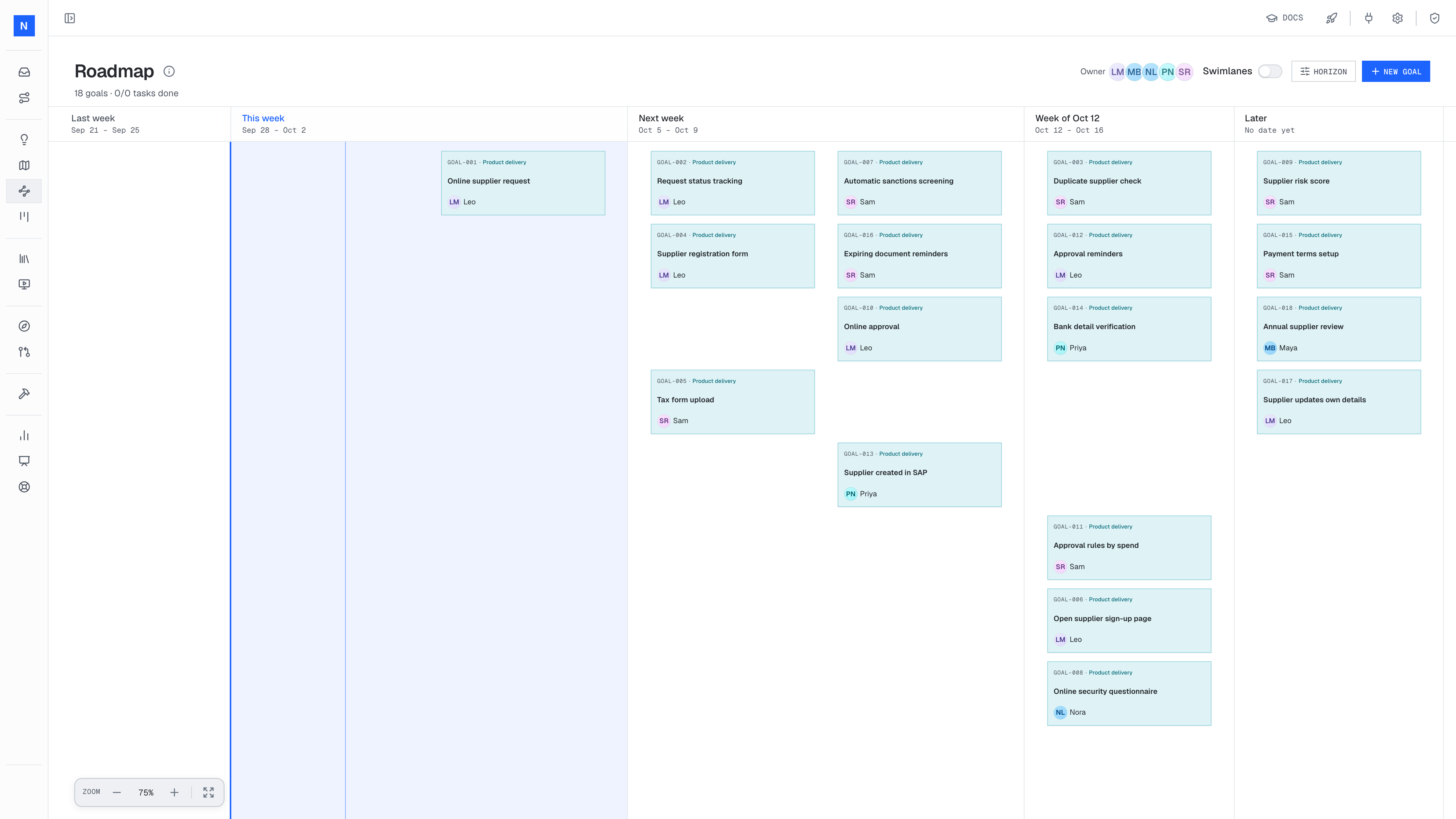
- 1The past window. The sheet always shows last week, and reaches further back only when an older goal needs it.
- 2Now, the band that contains today, in blue.
- 3A window. Each window is one week, or two weeks on a biweekly cadence.
- 4Later holds committed work that has no date yet.
To make one band wider or narrower on the sheet, drag its divider in the header. The width changes the layout only, not the dates.
Horizon settings
Click Horizon at the top of the roadmap to set how far the sheet plans ahead. The platform saves each change at once.
| Setting | Values | Effect |
|---|---|---|
| Cadence | Weekly or Biweekly | The length of each window. |
| Windows | 2 to 5 | The number of cadence bands after Now. |
| Months | 0 to 3 | The number of month bands after the windows. |
| Quarters | 0 to 2 | The number of quarter bands after the months. |
| Show Later | On or off | Shows the Later band at the right end. |
The sheet reaches back on its own to the oldest goal, so there is no setting for past bands.
Place the goals
Every product delivery goal from the story map is already on the sheet, in teal. Drag each card into the band where it should land. The platform changes the goal's due date to match the band. Place the walking skeleton first: the top goal of each story map column.
The goal also moves to the matching horizon bucket on the story map.
Add enabling goals
Click New goal at the top of the roadmap to add technical work. The dialog starts on Enabling delivery. Enter a title, pick the horizon, pick the owner and click Create goal. Enabling goals are plain white cards. Only product goals are teal.
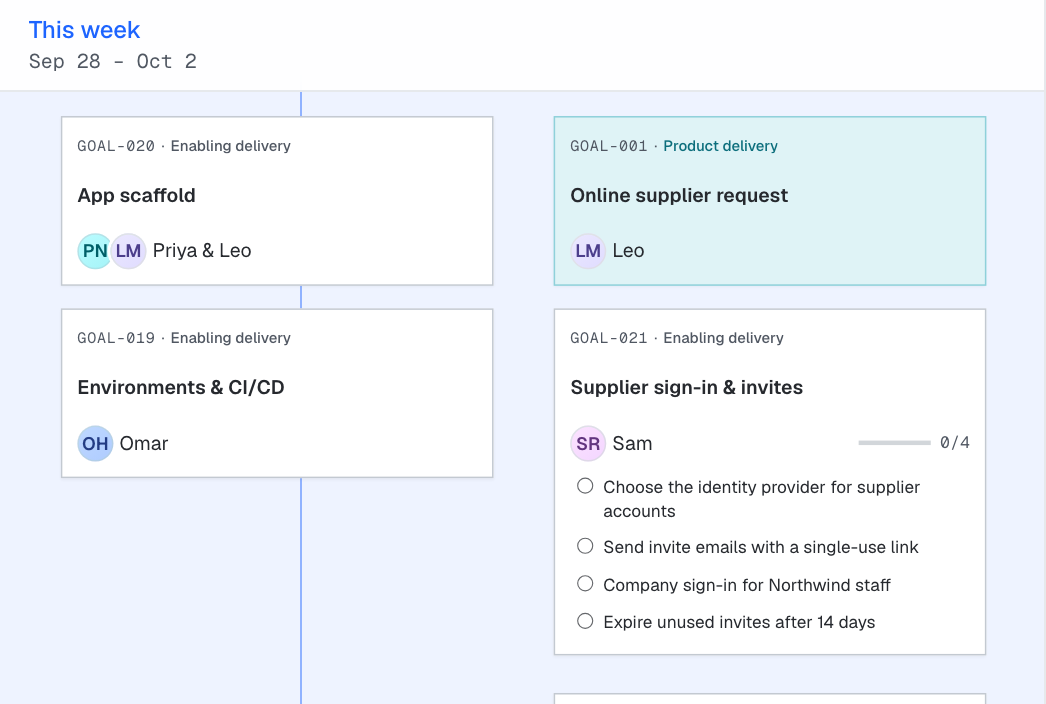
- 1Priya and Leo share App scaffold as a pair goal.
- 2Sam owns Supplier sign-in & invites. The card lists its four tasks.
To create a product goal on the roadmap, choose Product delivery as the kind in the New goal dialog, then pick the story map and the stage the goal belongs to.
Add discovery goals
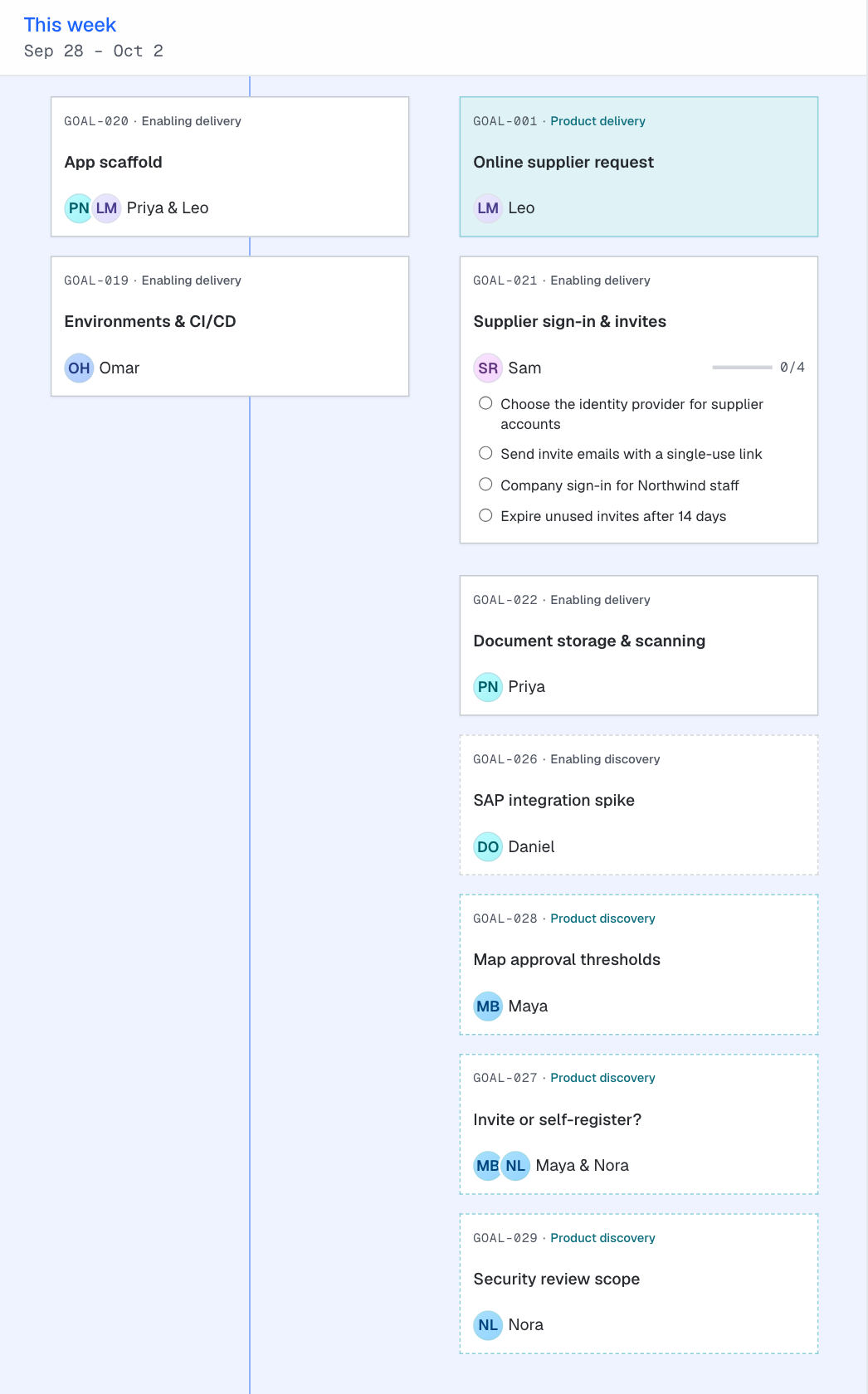
Open questions become discovery goals. In the New goal dialog, choose Product discovery for a question about the product, or Enabling discovery for a technical spike. Place the discovery goal in a band before the goals it shapes. A discovery card has a dashed edge and lies flat. A delivery card has a solid edge and is raised.
Assign owners
Every goal gets an owner, and the owner's avatar is on the card. Pick the owner in the New goal dialog, or in the goal sidebar.
For a pair goal, pick the owner first, then tick Pair goal and choose the Pair owner. In the goal sidebar, Add pair owner next to the owner does the same. The card then shows both avatars and both names. A goal has at most two owners.
The goal sidebar and tasks
Click a card to open the goal sidebar. The sidebar shows the owner, the kind, the horizon, the description, the tasks and the dependencies.
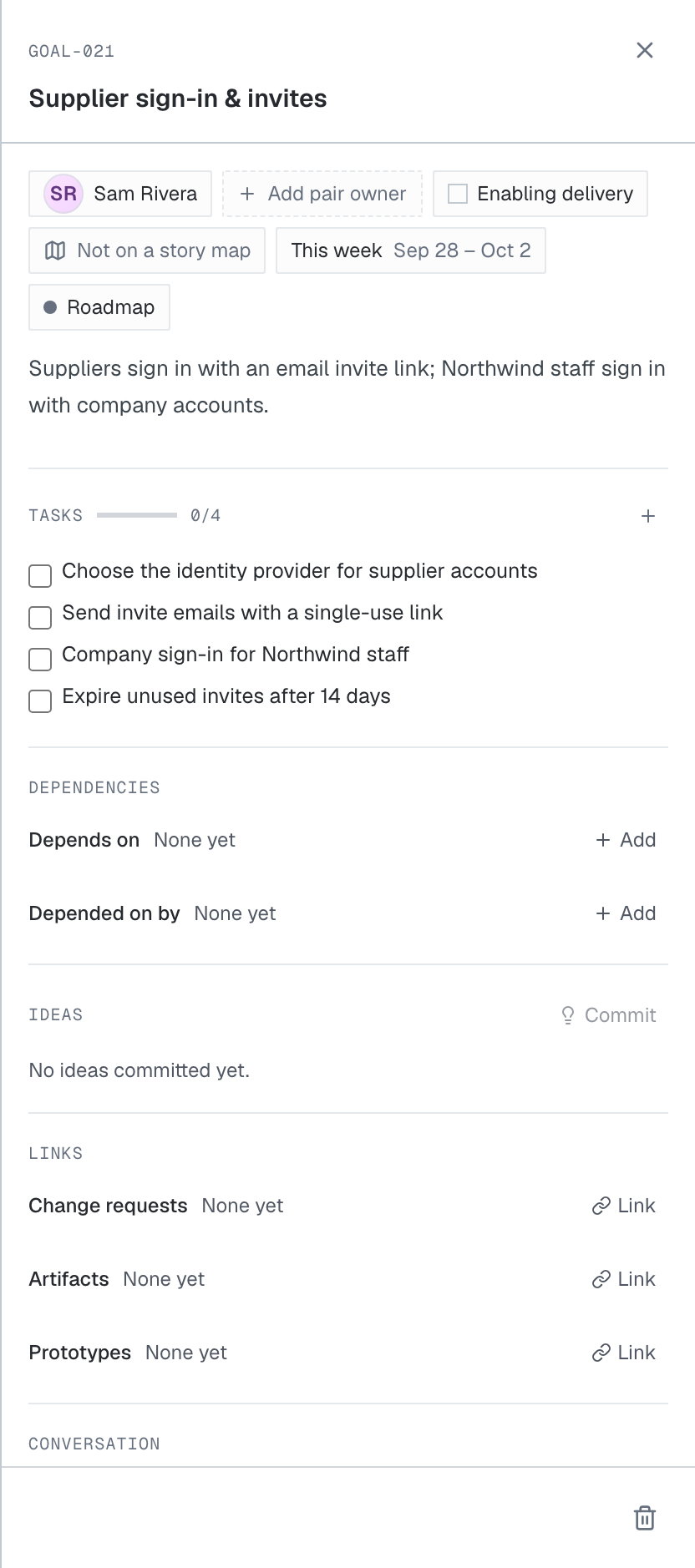
- 1The owner. Add pair owner, next to it, makes this a pair goal.
- 2The goal's kind.
- 3The tasks. The owner adds and orders them.
- 4What this goal depends on, and what depends on it.
Draw dependencies
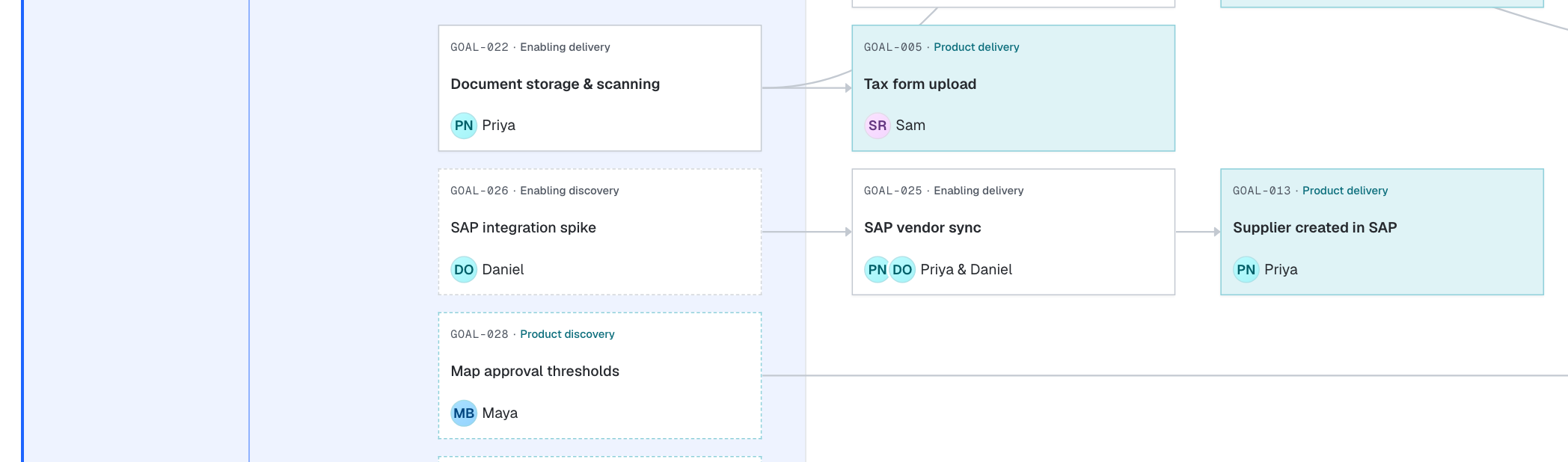
The arrow points from the goal that must land first to the goal that waits on it. To add a dependency, drag from the dot on a card's edge onto another card. You can also add one under Depends on or Depended on by in the goal sidebar. Click an arrow to select it. A selected arrow shows two buttons: Reverse swaps its direction, and Remove deletes it. Delete also removes the selected arrow. Drag either end of a selected arrow to move it to another card.
The platform refuses a duplicate arrow, an arrow from a goal to itself, and an arrow that closes a loop.
Swimlanes
Turn on Swimlanes at the top of the roadmap to see how each product goal gets done. The sheet then has one lane for each stage of the story map. A lane holds that stage's goals and, as faded ghost cards, the goals they depend on.

- 1"Shown here as a dependency" labels each ghost card.
The Set up payment lane shows the spike, then the sync, then the SAP goal. You can read the whole path to a working stage in one row.
Work that no stage depends on sits in the last lane, Standalone work. At Northwind, that is Environments & CI/CD and Monitoring & alerts.

From the map to the roadmap
Every product delivery goal on the story map is already on the roadmap. The team does not copy goals across. The product manager and the tech lead place each goal in a time band, and then add the work the map does not show:
- Enabling goals for the technical work the product needs, such as an app scaffold or an SAP integration.
- Discovery goals for what the team does not know yet. A discovery goal sits in front of the goals it shapes, so discovery and delivery run side by side.
- Dependencies as arrows between goals. Each arrow shows which work has to land first.
Time bands
The band where a goal sits sets its due date: the last day of that band.
From left to right, the sheet has these bands:
- The past window. Last week is always on the sheet, so "nothing was due last week" is visible. Older bands appear only where a goal sits.
- Now. The band that contains today.
- Windows. Two to five bands of one cadence each, weekly or biweekly.
- Months and quarters. Wider bands for work further out.
- Later. Committed work without a date.
The bands get wider further out, because the plan is less precise further out. A goal in This week has a firm date. A goal in a quarter band has a rough one. The sheet shows that difference without a separate confidence field.
Last week
Sep 21 –Sep 25
This week
Sep 28 –Oct 2
Next week
Oct 5 –Oct 9
Week of Oct 12
Oct 12 –Oct 16
November
Oct 17 –Nov 30
December
Dec 1 –Dec 31
Q1 2027
Jan 1 –Mar 31
Later
No date yet
Past
Now
Windows
Months
Quarters
Later
When a week ends, the Now band moves forward and the goals stay on their dates. An unfinished goal from last week is then in the past window, where everybody can see it.
Goal kinds
Two questions set a goal's kind:
- Does the user see the outcome? Then it is a Product goal. If the product or the system needs it, it is an Enabling goal.
- Is the work pinned down? Then it is a delivery goal, which builds. If the team still has to find out what is true, it is a discovery goal.
| Kind | Where it starts | Example |
|---|---|---|
| Product delivery | Under a stage on a story map. Every product delivery goal belongs to one. | Supplier created in SAP |
| Product discovery | On the roadmap, in front of the product goals it shapes. | Map approval thresholds |
| Enabling delivery | On the roadmap. It is technical, operations, quality or design work that the user does not see. | SAP vendor sync |
| Enabling discovery | On the roadmap. A technical spike is the common case. | SAP integration spike |
Product
what users getEnabling
what makes it possibledelivery
Solid edge, raised
GOAL-001 · Product delivery
Online supplier request
GOAL-025 · Enabling delivery
SAP vendor sync
discovery
Dashed edge, flat
GOAL-027 · Product discovery
Invite or self-register?
GOAL-026 · Enabling discovery
SAP integration spike
Product goals
Product delivery goals come from the story map. The team places the walking skeleton first: the goals above the MVP line, one per stage. At Northwind, its six goals land in the first two weeks. Richer goals, such as the supplier risk score, wait in Later.
Technical goals
Technical work that the product needs becomes enabling delivery goals. Enabling goals belong to no story map stage. Northwind needs supplier sign-in, an SAP vendor sync, document storage and an audit trail. Each of these becomes an enabling goal, one band ahead of the product goals it unblocks.
Discovery and delivery
Some goals still have an unclear shape. Put that uncertainty on the roadmap as discovery goals, in front of the goals they shape. A delivery goal builds something the team can describe. A discovery goal finds out what is true, and its result changes the plan.
Northwind has three open questions:
- Which approvals depend on spend? Maya maps the approval thresholds.
- Can suppliers sign up without an invite? Maya and Nora find out.
- Does SAP take vendor records by API or by file drop? Daniel runs a spike to answer it.
A spike is an enabling discovery goal: a short, owned piece of technical research.
Work that is certain starts at once. In the first week, Omar sets up environments and CI/CD, and Priya and Leo build the app scaffold. Discovery and delivery run side by side, in the same bands.
Discovery goals
A discovery goal has an owner and a band like any other goal. It closes when the team has the answer and has changed the goals it shapes. See replanning after a spike.
Owners and pair goals
Every goal has one owner. A pair goal has two owners who work on it closely. At Northwind, Priya and Leo share the app scaffold, and Priya and Daniel share the SAP vendor sync.
A goal is an area, not a ticket
A goal is an area of ownership. It closes when that area works well, not when one piece of code merges. The owner breaks the goal into tasks. When every task is done, the goal does not close by itself: a person decides that the area works and sets the goal to Done.
People set the goals. Roko Platform does not generate them, and it does not automate product planning. It gives the team one place to make and record these decisions.
Dependencies
A dependency is an arrow between two goals. It records which work has to land first. At Northwind, Supplier created in SAP waits on the SAP vendor sync, and the sync waits on Daniel's spike. See Draw dependencies.
The weekly rhythm
The product manager owns the story map. The roadmap belongs to the product manager and the tech lead together.
At least once a week, the product manager and the tech lead plan the roadmap together. They check the order of the goals and the dependencies, and they make sure every goal has an owner. When a discovery goal finishes, they replan the goals it shapes in the same session.
Worked examples
Northwind's first plan
Maya and Daniel build the first roadmap in one sitting.
Place the product goals
The product goals from the story map are already on the sheet. Maya and Daniel put each one in the band where it should land, the walking skeleton first.
Add the technical work
Daniel adds an enabling goal for each piece of technical work the product needs, one band ahead of the goals it unblocks.
Give every goal an owner
Each goal gets one owner or a pair.
Put the open questions on the sheet
Each unknown becomes a discovery goal in front of the goals it shapes.
Draw the dependencies
Maya and Daniel draw an arrow from each goal to the goals that wait on it.
Read it by stage
They check the path to each stage of the journey, one stage at a time.
Replanning after a spike
A discovery goal exists to change the plan. This example shows one such change. The spike result is invented for the example.
Suppose Daniel's spike finds that SAP takes vendor records only as a nightly file drop. A file drop needs an export job, a file format and a retry path, so the SAP vendor sync needs one more week.
Close the spike
Daniel records the answer on the spike and sets it to Done.
Reshape the goal it shaped
Priya and Daniel update the description and the tasks of SAP vendor sync for the file drop.
Move the goal and everything that waits on it
Maya and Daniel move SAP vendor sync to the Week of Oct 12. Supplier created in SAP waits on the sync, so they move that goal to November as well.
Check the stage and the owners
The Set up payment stage now completes in November. Supplier created in SAP is part of the walking skeleton, so Maya decides whether the first release keeps today's workaround for SAP entry. Daniel checks that Priya does not now own too many goals in one band.
Before
Before the spike
This week
Next week
Week of Oct 12
November
Enabling discovery
SAP integration spike
Enabling delivery
SAP vendor sync
Product delivery
Supplier created in SAP
After
After the spike
This week
Next week
Week of Oct 12
November
Enabling discovery
SAP integration spike
Enabling delivery
SAP vendor sync
Product delivery
Supplier created in SAP
The spike is done. The sync and the goal that waits on it move one band later, still in order.
Patterns
These patterns come up in most plans. Each one names when to use it.
Walking skeleton first
Use it for the first plan for a story map. Place the goals above the MVP line in the first bands, so one thin path through every stage works early. At Northwind, the six walking skeleton goals land in This week and Next week. Everything else follows.
Discovery in front of delivery
Use it when a delivery goal depends on an answer that nobody has yet. Add a discovery goal in an earlier band and draw an arrow from it to the delivery goal. The delivery goal's date then depends on a known piece of work, not on a guess.
This week
Next week
Week of Oct 12
Later
Product discovery
Map approval thresholds
Product delivery
Approval rules by spend
Enabling work one band ahead
Use it when a product goal needs technical work that does not exist yet. Place the enabling goal in the band before the product goal, or in the same band when it is small, and draw the arrow. At Northwind, document storage lands this week, and tax form upload lands next week.
This week
Next week
Enabling delivery
App scaffold
Product delivery
Online supplier request
Enabling delivery
Document storage & scanning
Product delivery
Tax form upload
Certain work starts now
Use it when discovery goals are open, and the team waits for answers. Start the work that no open question affects. At Northwind, Omar builds environments and CI/CD and Priya and Leo build the app scaffold while the three discovery goals run.
Pair goals for work that crosses skills
Use it when one person does not have every skill the goal needs, or the goal carries a lot of risk. Give the goal a pair owner. At Northwind, Priya (backend) and Leo (frontend) pair on the app scaffold. Priya and Daniel pair on the SAP vendor sync, because Daniel ran the spike. Maya and Nora, the product designer, pair on the question of self-registration.
Later, used honestly
Use it when a goal is committed, but nobody can name a band for it yet. Put the goal in Later. Do not give it a far-off date to make the plan look complete, and do not delete it. At Northwind, the supplier risk score, payment terms setup and the annual supplier review wait in Later.
Antipatterns
Each antipattern below has a symptom you can see on the sheet, the reason it hurts, and a fix.
Everything in Now
- Symptom
- The Now band holds more goals than its owners can finish, and the later bands are nearly empty.
- Why it hurts
- The dates stop meaning anything. Nobody can tell what is late, and the order of the work disappears.
- Fix
Keep in Now what the owners can finish this week. Move the rest to the band where it can really land, and draw the dependencies that set the order.
Avoid
Everything is due this week
This week
Next week
Week of Oct 12
November
Enabling
App scaffold
Enabling
Document storage & scanning
Enabling
SAP vendor sync
Product
Tax form upload
Product
Supplier created in SAP
Product
Bank detail verification
Priya owns five goals due this week, and the later bands are empty.
Instead
Each band holds what its owners can finish
This week
Next week
Week of Oct 12
November
Enabling
App scaffold
Enabling
SAP integration spike
Enabling
Document storage & scanning
Product
Tax form upload
Enabling
SAP vendor sync
Product
Supplier created in SAP
Product
Bank detail verification
Each owner has one or two goals per band, and the dates show a real order.
A date on a guess
- Symptom
- A delivery goal has a near date, but its shape depends on a question nobody has answered.
- Why it hurts
- The date is a guess, and the goal is likely to slip or to ship the wrong thing.
- Fix
Add a discovery goal in front of it, as in Discovery in front of delivery.
Avoid
A date on a guess
This week
Next week
Week of Oct 12
Later
Product delivery
Approval rules by spend
Nobody knows the spend thresholds yet, but the goal is due next week.
Instead
A discovery goal in front of the guess
This week
Next week
Week of Oct 12
Later
Product discovery
Map approval thresholds
Product delivery
Approval rules by spend
Maya finds the thresholds first. The delivery goal waits on her answer.
Hidden technical work
- Symptom
- The sheet shows only teal product goals.
- Why it hurts
- The technical work still happens, but nobody owns it on the plan. Product goals slip for reasons the sheet does not show.
- Fix
Add an enabling goal for each piece of technical work and draw the arrow to the product goals it unblocks.
Avoid
Only product goals on the sheet
This week
Next week
Product delivery
Online supplier request
Product delivery
Tax form upload
The sheet says nothing about the scaffold or the document storage these goals need.
Instead
The enabling work is visible and owned
This week
Next week
Enabling delivery
App scaffold
Product delivery
Online supplier request
Enabling delivery
Document storage & scanning
Product delivery
Tax form upload
Each enabling goal sits in front of the product goal it unblocks.
Product goals that do not trace to the story map
- Symptom
- Product goals on the roadmap belong to no story map stage.
- Why it hurts
- Nobody can say which step of the user's journey the goal improves, or which persona it serves.
Avoid
Product goals that no stage asked for
This week
Next week
Week of Oct 12
Not on a story map
Supplier portal v2
Not on a story map
Admin dashboard
Not on a story map
Vendor analytics
Instead
Every product goal belongs to a stage
This week
Next week
Week of Oct 12
Request a supplier
Online supplier request
Invite & register
Tax form upload
Approve the supplier
Approval rules by spend
Goals without an owner
- Symptom
- A card has no avatar.
- Why it hurts
- A goal without an owner has nobody to break it into tasks, and nobody to say when it works well.
- Fix
Give every goal an owner in the weekly planning session. If nobody can own it, move it to Later.
Avoid
Goals nobody owns
This week
Next week
Week of Oct 12
Enabling delivery
Audit trail
Enabling delivery
Monitoring & alerts
Instead
Every goal has a name on it
This week
Next week
Week of Oct 12
Enabling delivery
Audit trail
Enabling delivery
Monitoring & alerts
Tickets dressed as goals
- Symptom
- The sheet has many small cards, each one a single change.
- Why it hurts
- The sheet becomes a task list, and nobody owns the area that the changes add up to.
- Fix
Make one goal for the area and put the changes inside it as tasks.
Avoid
Tickets dressed as goals
This week
Enabling delivery
Add invite email
Enabling delivery
Fix sign-in button
Enabling delivery
Expire old invites
Instead
One goal per area, with tasks inside
This week
Enabling delivery
Supplier sign-in & invites
- Choose the identity provider
- Send invite emails
- Company sign-in for staff
- Expire unused invites
Common questions
What sets a goal's due date?
The band. A goal's due date is the last day of its band. A goal in This week (Sep 28 to Oct 2) is due on Oct 2. A goal in Later has no due date.
What happens to a finished goal?
It stays in the band it was due in, and its card shows when it finished.
How many owners can a goal have?
One owner, or two as a pair goal.
Does finishing every task close the goal?
No. A person sets the goal to Done, and only when every task is done.
Should every goal have a date?
No. Put committed work that nobody can date yet in Later. A made-up date is worse than no date, because the team plans around it.
Can I create a product goal on the roadmap?
Yes. Click New goal and choose Product delivery as the kind. Then pick the story map stage the goal belongs to, so it traces to the journey. New goal starts on Enabling delivery.
Does moving a card on the roadmap change the story map?
The goal's due date changes, so the goal moves to another horizon bucket on the story map. Its stage and its rank in the column stay the same.